

Architecture
This page says what a knowledge bundle is, which role KTL Registrar plays in keeping one, and how the bundle sits beside your own notes. It is for anyone deciding whether to use the plugin, and for anyone who keeps a bundle with it. Install gets it running, and Using it lists the report panel, the in-editor diagnostics, the commands, the settings and the read-only API for other plugins.
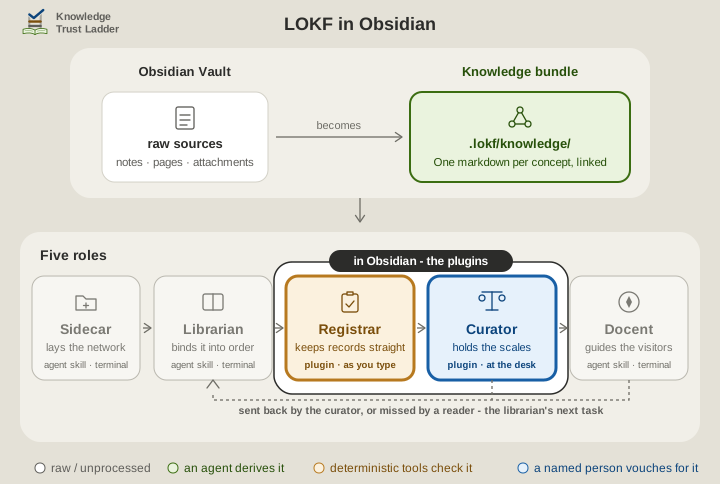
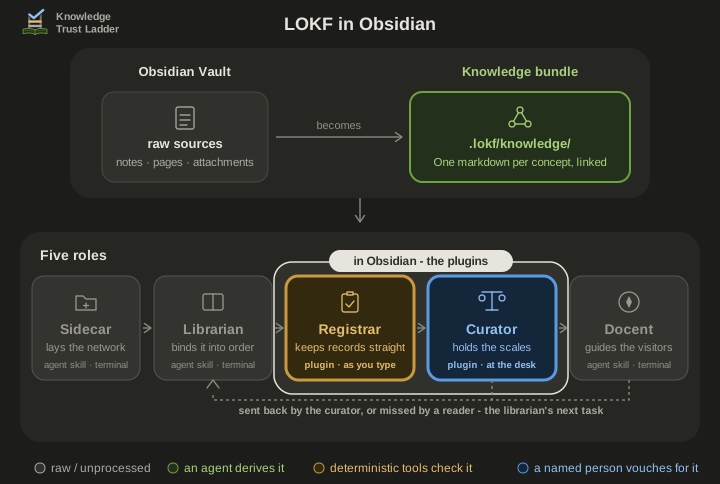
A bundle is a folder of Markdown notes in the Linked Open Knowledge Format (LOKF): one concept per note, a few properties on each, and an index.md at the root that names the bundle. The knowledge-trust-ladder skills build one beside whatever they are run on: a code repository, a vault of notes, a folder of documents.
This plugin is the registrar of that family: it checks that every record is well-formed. Its sibling KTL Curator records what a person decides about each record. Neither reaches a verdict of its own. The judging stays with the person.
The skills’ architecture page sets out all the roles, and the fifth role covers the two plugins. For anyone who works under the three lines of defence, this plugin is second-line work: it keeps the format and never judges truth. docs/three-lines.md says where the rest sit.
Obsidian is optional in both directions: the skills rely on lokf validate, not on this plugin, and the plugin works on any LOKF bundle however it was made. The format is all they share.
Two vaults
Section titled “Two vaults”Your everyday Obsidian vault is the workshop. The bundle is the exhibition: a second, smaller vault that you open through the knowledge_bundle link the skills leave at the root of the host. The two never index the same file, so nothing here touches your notes.
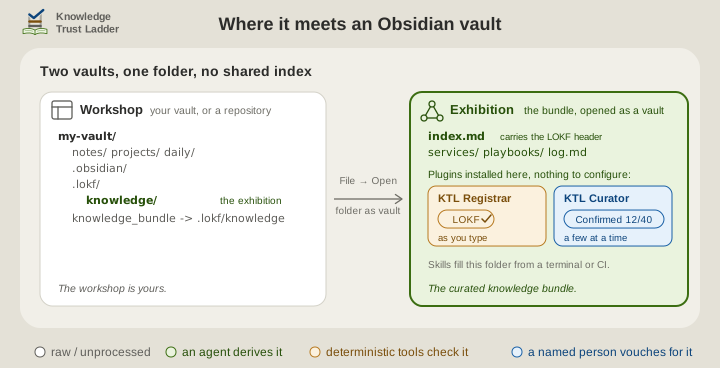
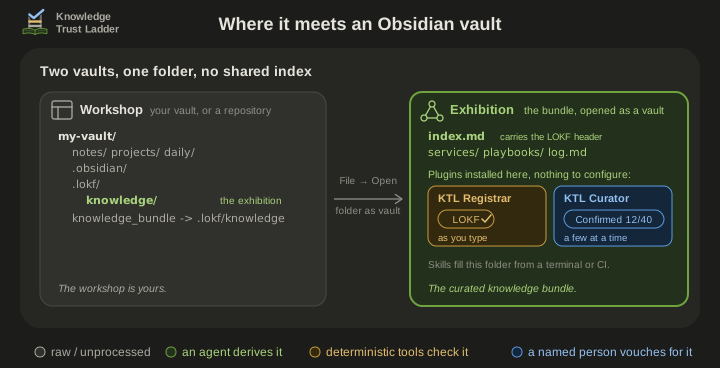
The skills’ playbook Open the knowledge bundle in Obsidian records how the knowledge_bundle doorway behaves on each host. If the link is missing, make it with ln -s .lokf/knowledge knowledge_bundle (or mklink /J knowledge_bundle .lokf\knowledge on Windows), or open .lokf/knowledge by path.
Which folder is the bundle
Section titled “Which folder is the bundle”With nothing configured, the vault decides:
- A root
index.mdwith a LOKF header means the whole vault is the bundle, which is the case whenever you openknowledge_bundleas a vault. - Otherwise a top-level
knowledge_bundle/folder with its ownindex.mdis the bundle, and notes outside it are left alone. - Otherwise there is no bundle. Nothing is scanned and every command says so.
Two settings widen that under Settings → Scope and performance:
- Bundle root folders: for a bundle that sits as a folder inside a larger vault, or several of them (
bird-watching, projects/art-portfolio). Each is an independent bundle with its ownindex.mdandbase_iri. Notes outside every listed folder are ignored. Obsidian indexes such a folder like any other, so exhibits mix with your notes in search, graph and link suggestions. The skills install the bundle as a separate vault instead, and the playbook’s last section says why. - Treat the vault root as the bundle: a break-glass switch for a vault that really is a bundle but whose root
index.mdhas no header yet.
A folder inside a dot-folder is accepted, but it is scanned only if something has put it in Obsidian’s index. The community plugin Hidden Folders Access does that. Otherwise the scan says so, rather than reporting an empty bundle as clean.
Privacy
Section titled “Privacy”The plugin makes no network requests, sends no telemetry and uses no external services. It reads the Markdown in the open vault and writes only when you run a command that edits a note: the header, safe-fix, promote-relations and affordance commands, and the report’s Fix this finding and Silence this note actions. Settings live in the vault’s own plugin data.
Development
Section titled “Development”See CONTRIBUTING.md. The layout follows the upstream obsidian-sample-plugin. npm run lint runs Obsidian’s own eslint-plugin-obsidianmd ruleset.
src/ main.ts plugin lifecycle: commands, status bar, vault scan, the editor aids validator.ts the LOKF rule set and bundle-root resolution - import-free, runs under plain Node report-view.ts the side-panel report scaffold-modal.ts the two-choice modal behind "Insert the bundle's semantic header" public-api.ts the read-only API offered to sibling plugins settings.ts declarative settings tab (Obsidian 1.13+) ... quick-switchers, autocomplete, safe fixes, affordances, relation promotion - one module eachscripts/ smoke-test.ts validator fixtures + whole-bundle golden fixtures (npm run smoke-test) build-vocab.mjs regenerates src/lokf-vocab.json from a pinned lokf.yaml (a maintenance step) fixtures/ frozen copy of the ktl-sidecar template skeleton the smoke test validatesdocs/ the reasoning behind the checks.lokf/ this repository's own LOKF knowledge bundlesrc/validator.ts takes already-parsed frontmatter and imports nothing, so the whole rule set runs under plain Node via npm run smoke-test with no Obsidian install. src/main.ts does the parsing, with Obsidian’s own parseYaml.
This repository’s own bundle
Section titled “This repository’s own bundle”This repository keeps a bundle of its own under .lokf/knowledge/, maintained by the knowledge-trust-ladder skills, which a scheduled workflow installs at run time. It is what the docent answers from, and none of it is part of the plugin. CONTRIBUTING.md says which skills you need to contribute to it.
Read on
Section titled “Read on”| How to get a bundle, where to install the plugin, and the quick start | install.md |
| The report panel, the in-editor diagnostics, the commands, the settings and the read-only API for other plugins | using.md |
| What LOKF adds over plain OKF, the OKF v0.2 rules checked underneath, what is left unchecked, why almost everything is a warning, and what each host layout means for the plugin | for-the-curious.md |
| The roles, the trust ladder and the two plugins, on the skills’ own pages | architecture, the bundle in Obsidian |
| Contributing, the code of conduct and the AI covenant; reporting a security issue | CONTRIBUTING.md, CODE_OF_CONDUCT.md, AI_COVENANT.md, SECURITY.md |
Credits
Section titled “Credits”- Nolan Nichols, creator of LOKF and its toolkit.
- The LinkML Community, creators of LinkML, the schema language LOKF is written in.
- Introducing the Open Knowledge Bundle, Google blog, creator of the Open Knowledge Format specification.
- LLM Wiki, Karpathy, a pattern for building personal knowledge bases using LLMs.
- obsidian-sample-plugin, whose build, lint and release layout this repository follows.
- knowledge-trust-ladder, the registrar role this plugin fills in the editor, and whose bundle template the smoke test validates.
- KTL Curator, the sibling plugin, forked from this one and sharing the bundle-root plumbing in
src/validator.ts.
We know of no other tool that checks the LOKF semantic layer. Validators for the plain OKF v0.2 layer beneath it exist, such as OKF Enforcer. This plugin checks the same base rules, so none is required.
License
Section titled “License”Apache License 2.0; see also NOTICE.