

The bundle in Obsidian
This page is for the people who open the bundle in Obsidian.
Two vaults
Section titled “Two vaults”The Obsidian vault you already have is the workshop, and nothing in it is moved or migrated. The bundle is the exhibition: the checked part of what the workshop knows, and the part that teammates, CI and agents read. It opens as a small vault of its own, and the two never index the same file.
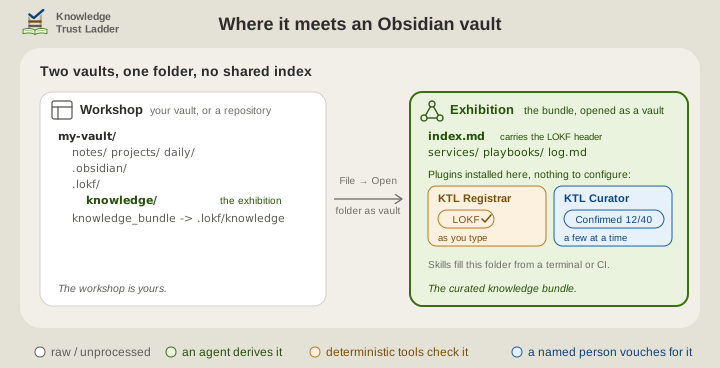
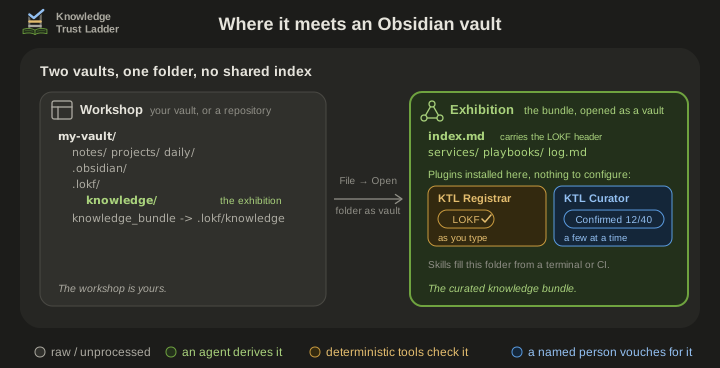
- Open the bundle as a vault. Choose File → Open folder as vault, and pick
knowledge_bundleat the root of the host, the repository or vault the bundle sits in.ktl-sidecarcreates that doorway beside.lokf/, so the bundle has a name a folder picker can see. - Install the plugins in that vault. Obsidian installs plugins per vault. There is nothing to configure: the root
index.mdcarries the bundle’s header, so the whole vault is the bundle. - Edit and confirm there. Obsidian writes that vault’s workspace state to
.lokf/knowledge/.obsidian/, which the sidecar’s.gitignoreexcludes.
knowledge_bundle can be missing: a sync service dropped it, or a Windows checkout without core.symlinks shows it as a small text file. In that case open .lokf/knowledge by typing the path into the picker, or make the link once from the host root:
ln -s .lokf/knowledge knowledge_bundle # or `just lokf-link` from .lokf/mklink /J knowledge_bundle .lokf\knowledge # Windows: a junction, no administrator rightsPlugin for skill
Section titled “Plugin for skill”Obsidian is optional in both directions. The skills rely on lokf validate, not on a plugin. The plugins work on any LOKF bundle however it was made, and a vault with no bundle in it is left alone.
A bundle is a folder of Markdown notes with a few properties each, which is what Obsidian edits. And the people who confirm knowledge are often not the people who run agents or terminals, so a plugin in an editor they already use is where they work.
| Role | Skill or tool | Obsidian plugin |
|---|---|---|
| Sidecar | ktl-sidecar |
- |
| Librarian | ktl-librarian |
none (deriving is an agent’s job) |
| Registrar | lokf validate, knowledge-registrar.yaml |
KTL Registrar: the same checks, as you type |
| Curator, always a person | ktl-curator, the person’s assistant |
KTL Curator: the same assistant, inside Obsidian |
| Docent | ktl-docent, lokf serve |
- |
Where the bundle lives, host by host
Section titled “Where the bundle lives, host by host”The skills install the same layout on every host: the real folder .lokf/knowledge/, and the knowledge_bundle doorway beside it. Where the host’s folder sits decides what a plugin can reach from the bundle’s vault, and what syncs.
- A code repository. The librarian derives the bundle from code and docs, and you check it in
knowledge_bundleopened as a vault. Concepts cite sources above that vault, such assrc/…anddocs/…, which no plugin can open from that vault. The KTL Curator plugin shows such a source as a path with a copy button. - Your vault, kept in git. Run the skills at the host, and the sidecar is installed beside your notes. Your vault indexes neither
.lokf/nor the doorway, so it never sees the bundle, and you curate in a second vault opened through the doorway. The bundle stays in the one repository with the notes it was derived from. Splitting it into a repository of its own is a later choice for a team. - A shared drive or a SharePoint library. The sidecar syncs as files. OneDrive syncs neither symbolic links nor junctions, so make the doorway per machine with
just lokf-linkin.lokf/, or open the bundle by path. A team that wants a synced, visible folder may rearrange by hand, with a realknowledge_bundle/and.lokf/knowledgelinking onto it, as the sidecar’sportability.mdsays. Both plugins then detect the folder as a bundle inside a vault (Which folder is the bundle on either plugin’s architecture page). - Many hosts, one vault. Link each repository’s
.lokf/knowledgeinto a folder of your own vault (projects/acme-knowledge → ~/git/acme/.lokf/knowledge) and list those folders under the plugins’ Bundle root folders setting. Every bundle you curate is then in one vault, beside the notes you keep about them, and the KTL Curator plugin can open each source beside its claim. This is the one arrangement that puts exhibits in your vault’s index, at the cost the plugins’ architecture pages name. Obsidian Sync does not copy such links.
Where the rest is written
Section titled “Where the rest is written”- Where the two plugins fit among the roles is in the architecture: one does the registrar’s work, and the other assists the curator.
- Using each plugin: the status bar, the report, the review card and the commands are on each plugin’s usage page, KTL Registrar and KTL Curator.
- How Obsidian treats the doorway on each host is in this repository’s playbook Open the knowledge bundle in Obsidian, which also says why the bundle is never a folder inside a vault. Hosts and doorways records why there is one layout.
- Shared folders, Windows, and hosts without git are in the sidecar’s
portability.md. - An agent asked the same question answers from
ktl-docent/references/obsidian.md, which says the same in fewer words.